Articles in this topic
Places and directions
The Places & directions section lists the venue, the church, parking, shuttle, restaurants and hotels of the day, with times, phone numbers, map links and booking links.
4 min read
Party and event websites only.
Guests ask the same questions every time: where is the ceremony, where do I park, is there a bus, where can I stay? The Places & directions section answers them. It has three designs — Cards, List and Map Left — and the same content in all three. An accommodation page is a Places & directions section with hotel cards.
Add the section
-
In the Sections tab, click + Add Section, choose Places & directions and a design.
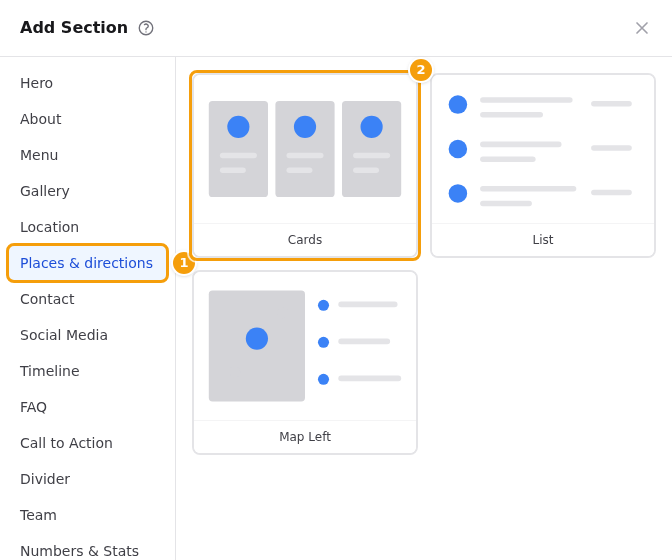
Add Section: Places & directions (1) and its three designs (2) -
In the Editor tab, fill in the Title and an Intro text (both optional) and click Add a place.
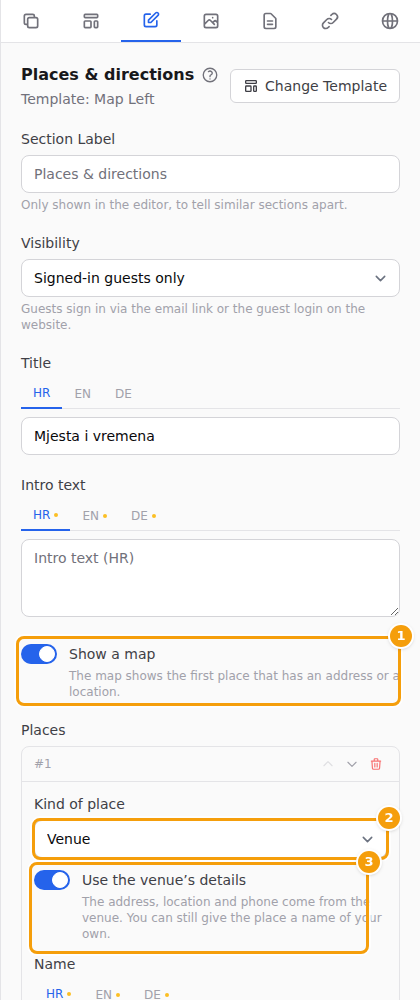
The Places editor: Show a map (1), Kind of place (2) and Use the venue's details (3) -
Pick the Kind of place: venue, church, parking, station, shuttle, restaurant, hotel, guesthouse, apartments or other place. The kind decides the pictogram and the label.
Move a place up or down and remove it with the small buttons at the top of its box.
What a place can say
- Use the venue's details — takes the name, address, location and phone from your venue, in one click. You can still type a name of your own.
- Name, Address, Latitude and Longitude, Phone. With a location the map shows the exact spot; without one it searches for the address. The phone is shown and dialled the same way everywhere in the app.
- Map link — leave it empty and "Open in maps" is made from the location or the address.
- Time — for example the ceremony or a departure. Guests see it on their language's clock (2:30 PM in English, 14:30 in Croatian and German).
- Distance or travel time and Directions and notes — a few lines; line breaks are kept.
- Photo — a picture of the place.
- For a hotel, guesthouse or apartments: a Booking link, a Price note ("from 65 EUR per night, breakfast included"), a Booking code and What the code gives.
Every text has a box for each language of your website, like the other sections. A language you leave empty shows the English text, never nothing.
The map
The Show a map switch puts a map of the first place that has an address or a location on the page (the Map Left design makes it the main part). Switch it off if you do not want a map.
Good to know
On a closed party the section starts for signed-in guests only, so the address and the phone numbers are not shown to strangers. See Who sees a page or a section.