Articles in this topic
The series website and its design
The website every series gets, its pages and sections for members, and how to give all meetups of the series one design with a single click.
8 min read
Every series has a website of its own, built with the same editor as the website of a party. Visitors see it, members sign in on it, and each meetup of the series has its own website that follows the design of the series.
The website of the series
When you create the series you choose the Website design. With Series home page the website is made for you and is live at once; with Blank (build the website yourself) there is no website until you build one. On the series page, Edit the series website opens the editor, and Public page shows what visitors see. While the website is not published, the Overview tab says so. How the editor works is in What the website editor does and Publish your changes.
The Series home page has three pages:
| Page | Who sees it | What is on it |
|---|---|---|
| Home | Everyone | An introduction, the meetups, the sign-up form, questions and answers, the venue and sharing buttons. |
| Members | Signed-in members | The membership card, the upcoming meetups, who is coming and the member directory. |
| Sign in | Visitors who open a members page | A page where members ask for their sign-in link. |
After signing in, a member lands on the Members page. A visitor who opens it sees the sign-in page. Series websites are public, and there is no date on them, because a series has none.
The sections for a series
Five sections of the website editor are made for series. You add them like any section and they appear in the list of sections only on a series website or on the website of one of its meetups.
| Section | Shows | Where it can stand |
|---|---|---|
| Series meetups | The meetups to come and, below them, the earlier ones, as a list, cards or a timeline. Each has a button that fits the visitor: Book, Join the waiting list, Booked, Join to book (for a members-only meetup) or Details. You choose how many are shown. | Series and meetups |
| Series membership | For visitors the sign-up form and a Sign in link; for members their card, referral link, profile editor and Leave the series. | Series only |
| Who is coming | The members who have booked a meetup and are listed, and how many more are coming. On the series it lists every upcoming meetup. | Series and meetups |
| Member directory | The listed members with a search box: photo, name, headline, visible answers and links, but no email, phone or about text. | Series only |
| Speakers | The speakers you entered on the meetups. On the series page they are those of the next meetup or of all upcoming ones. | Series and meetups |
Who is coming and Member directory are only ever shown to signed-in members, whatever visibility you set for the page or section. On a meetup's website a member sees who is coming before they have booked; a visitor never does. In the builder's View as guest preview, these sections show a note instead of real members.
The website of a meetup
Every meetup gets its own page, made from the Meetup page design: introduction, countdown, tickets, location, speakers, who is coming for members, more meetups and questions. You edit it from the meetup like the website of any event, see Events at a glance.
One design for every meetup
A meetup takes the colours, fonts, theme and background of the series website, not of your venue's. A new meetup copies the design when it is created, so all meetups look alike.
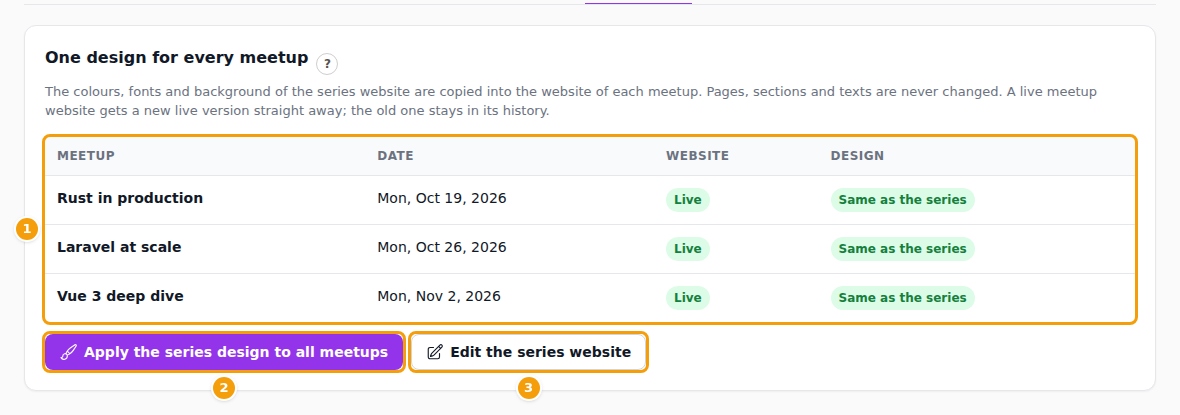
When you change the design of the series later, open the series and choose the Design tab. The table (1) lists every meetup with its Website, Live or Draft only, and whether its Design is Same as the series or Different.
Click Apply the series design to all meetups (2) and confirm. The colours, fonts and background of every meetup website are replaced with those of the series website. Pages, sections and texts are never changed. A live meetup website gets a new live version at once, and the earlier version stays in its version history. A meetup without a website is skipped, and Clava lists any meetup it could not update. Edit the series website (3) takes you to the editor.
Tip
Publish the series website first. Meetups copy its live version; a series that was never published is copied from its draft.
In the editor of a single meetup, the design card says Series design and offers Copy the series design. Use it to bring a meetup back in line with the series, for example after you chose another template for it. See also An event website in your location's design.
On your venue's website
The two event sections of your venue's own website can be limited to Only this series, and the menu can link to the website of a series. See Events on your website.