Articles in this topic
Event series at a glance
What an event series is, which plans include it, how to create one under Series in the sidebar and what you find on its Overview tab.
6 min read
An event series is a regular event for the same people: a monthly developer meetup, a doctors' evening, a business breakfast. People sign up once and are then members. Only members can book the meetups of the series, unless you open a meetup to everyone. The series has a website of its own, and all its meetups share one design.
A series brings these things together:
- its members: who may join, how, and what they say about themselves — see Members and Member profiles;
- its meetups: ordinary events with extras for members, speakers and a waiting list — see Meetups of a series;
- its website and one design for every meetup — see The series website and its design;
- an optional organiser, a person who runs the series with an account of their own — see The organiser.
Which plans include it
Important
Event series are part of the Pro plan (one series) and the Ultimate plan (as many as you like). The free trial includes them as well; the free plan does not. Archiving a series gives its place back to your plan.
When your plan has no room for another series, New series is switched off and the page says You cannot create more series right now; otherwise it tells you how many more series your plan allows. If you move to a smaller plan, your series stay readable and keep working, you just cannot create new ones. Colleagues with view access can look at series, but only editors can change them.
Where to find series
Open Series in the menu on the left of Party Management, below Events. The entry only shows when your plan includes event series. The meetups of a series are listed under Series too, not under Events.
Series can be switched off for the whole brand (Brand settings, Features) or for one location. While they are off, the Series entry is hidden and nothing new can be changed except archiving; existing series keep their public pages. See Switch events and series off.
The list of series
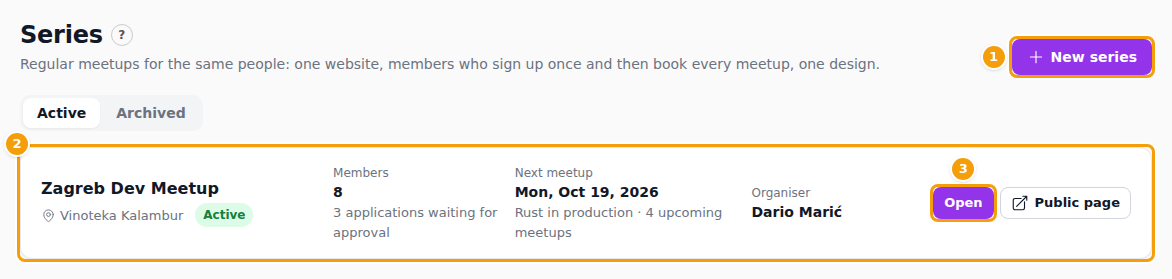
Two tabs, Active and Archived, choose which series you see. New series (1) creates one.
Each series is a card (2): its name and venue, how many Members it has and how many applications wait for approval, the Next meetup with the number of upcoming meetups, and the Organiser. Open (3) opens the series; Public page shows its website. A series whose website is not live yet says Website not published.
The "?" next to the title opens this help.
Create a series
Click New series. The form has four short parts; you can change nearly everything later, and Create series at the bottom saves it.
- Basics: the Name of the series, the Venue (shown when your brand has several locations; it cannot be changed afterwards), a short description, an image, the Website design — Series home page or Blank (build the website yourself) — the Member limit and Runs until. Leave the limit empty for no limit and the date empty for 10 years. Here you also choose what one occurrence is called, see What an occurrence is called.
- Members: Open, With approval or By invitation only, whether New members need a referral, and an Email domain. All of it is explained in Members.
- New meetups: what every new meetup of the series starts with — Who can book a new meetup, When a place is freed, How members sign up (free registration or tickets), Number of guests, Places for guests of a member and whether The organiser may add meetups. Each meetup can still differ, see Meetups of a series.
- Organiser (optional): name, email and phone of the person who runs the series, and whether to email them their sign-in link now. See The organiser.
Saving creates the series website from the design you chose: with Series home page it is ready and live at once, with Blank you build it yourself in the website editor.
What an occurrence is called
Not every series meets as a "meetup": a band has sessions, a studio gives workshops, a wine bar holds tastings. Each series chooses the word for one of its occurrences, and the app then uses that word everywhere for that series. This help keeps saying meetup as its generic word; read it as "whatever your series calls it".
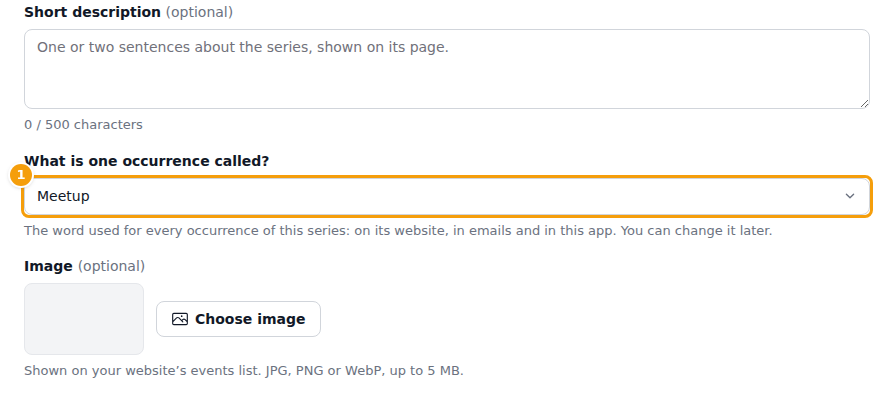
You choose the word in What is one occurrence called? (1), in step 1. Basics of the form, when you create the series and later on the Settings tab. Only your team sees it; the organiser reads the word but cannot change it. A new series starts with Meetup, and a series that existed before this setting keeps reading exactly as it did.
The list offers eight ready-made words, in the language of your screen:
Meetup, Session (music, jam), Workshop or class, Tasting, Club night, Show or performance, Game night and Gathering.
They are written in full in every language the app speaks, so Croatian and German read correctly too ("Nova svirka", "Neue Session").
Your own words
Choose Custom words… at the end of the list when none of the eight fits, for example talk.
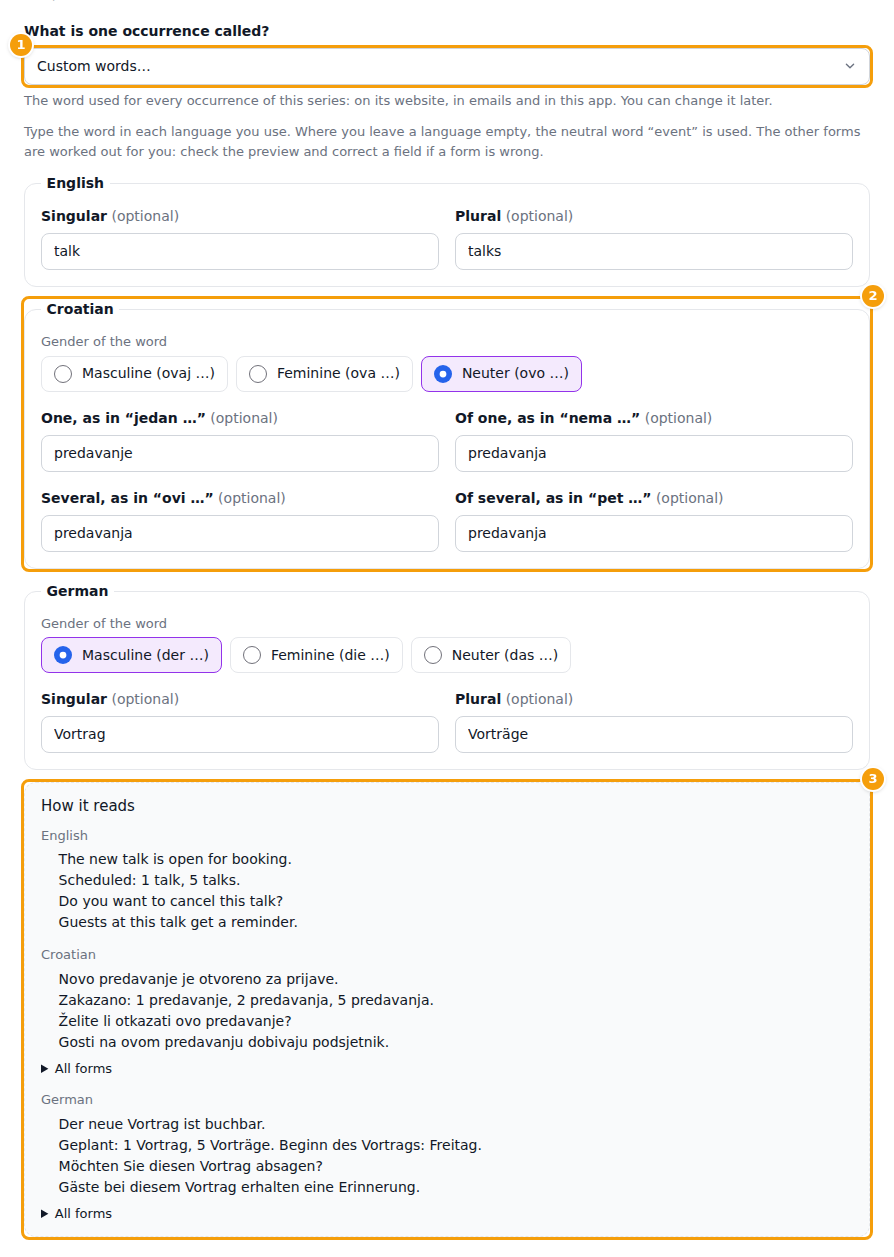
Type the word once for each language you use; every field is optional:
- English: the singular and the plural.
- Croatian: the gender of the word and four forms, the way a Croatian counts: jedan …, nema …, ovi …, pet … (2).
- German: the gender and the singular and plural.
The other forms (for example the ending after "na" or "o") are worked out for you. Under How it reads (3) you see four short sentences in each language, such as "The new talk is open for booking" and "Zakazano: 1 predavanje, 2 predavanja, 5 predavanja". If a form is wrong, correct the field; All forms lists every form. A language you leave empty uses the neutral word "event". Words can have up to 40 characters, and a phrase of several words is taken as you type it.
Where the words appear
- In the Events app: the series list ("Next talk"), the tab, the buttons ("New talk"), the forms and the messages of that series.
- On the website of the series: the headings, the membership texts, the waiting list and the speakers, in the language of the visitor.
- In emails: the emails of the series name the word in the language of the member. For your own words, English, Croatian and German use them; an email in another language says "event".
- In the organiser's area: the menu entry and the texts of that series.
Three things do not change: the name of Series in the menu, the name of your series, and texts that you wrote yourself in the website editor. A website made from a template takes the words at the moment it is made; if you change the word later, edit the headings on the website yourself. Everything the app prints on its own follows the new word at once.
The series page
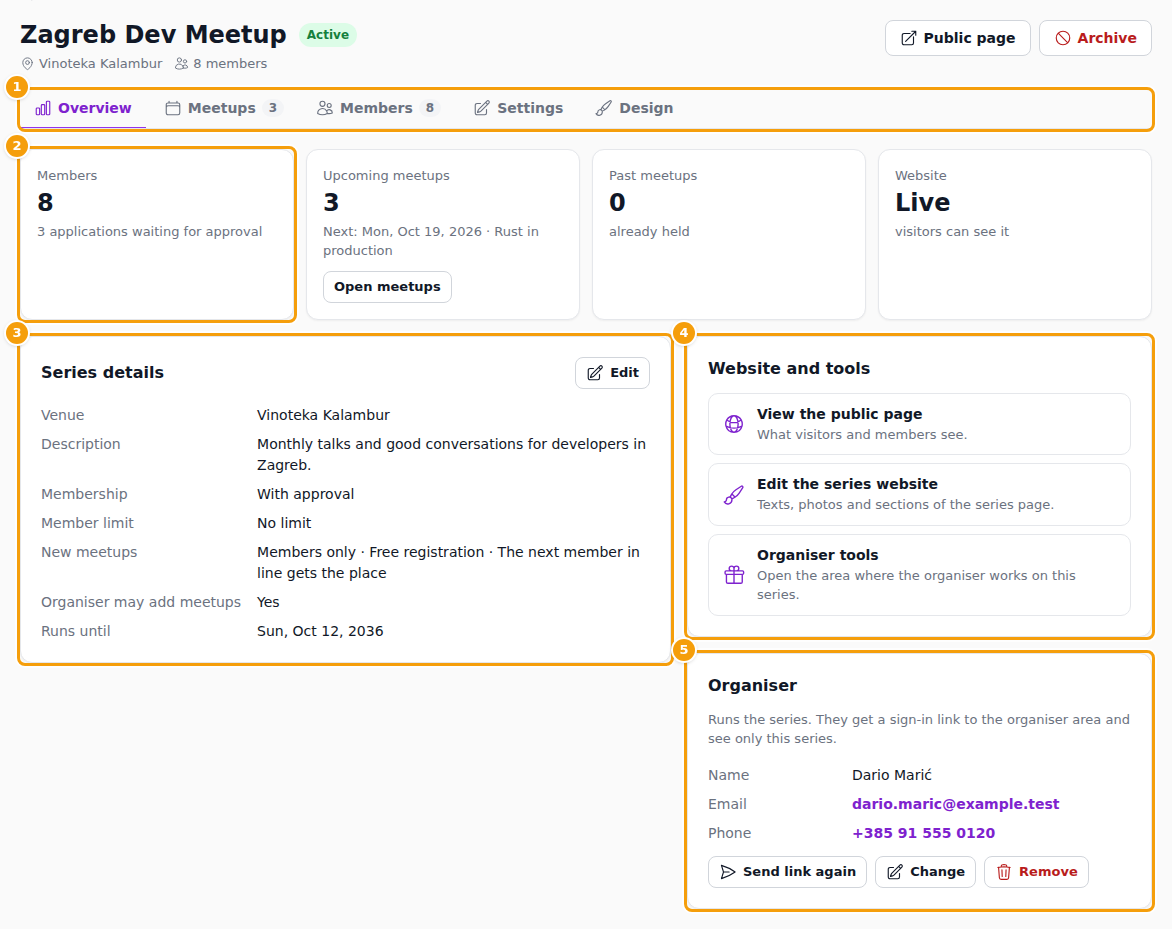
Open shows the series with its name, status, venue and number of members, the Public page button and Archive. Five tabs (1) divide the work:
| Tab | What it is for |
|---|---|
| Overview | The numbers and the details of the series, described below. |
| Meetups | The meetups of the series, with New meetup. See Meetups of a series. |
| Members | Applications, members, invitations and the member list. See Members. |
| Settings | The same form as when you created the series, and the questions members answer in their profile. See Member profiles. |
| Design | One design for every meetup. See The series website and its design. |
The Overview tab starts with four numbers (2): Members with the applications waiting, Upcoming meetups with the next one and Open meetups, Past meetups and the Website, Live or Not published. Series details (3) lists the venue, description, membership, member limit, what an occurrence is called, what new meetups start with, whether the organiser may add meetups and the end date; Edit takes you to the Settings tab. Website and tools (4) has View the public page, Edit the series website and Organiser tools. The Organiser card (5) shows who runs the series, with Send link again, Change and Remove.
Archive a series
When a series ends, click Archive and confirm. Its members are signed out, nothing is deleted and its meetups are not changed, and the place in your plan is free again. An archived series is read-only. Restore brings it back, if your plan has room for it.