Articles in this topic
Support
Ask Clava a question, report a problem or share an idea — open a ticket, follow it, reply and close it.
3 min read
If the help centre doesn't answer your question, ask the Clava team. You do it with a ticket: a message that stays together with every reply. Open Support in the menu (group Support) of Configuration.
Good to know
Support is part of Configuration, so administrators open it. Everyone who is an administrator of your business sees the same tickets.
Open a new ticket
-
Click New ticket (1).
-
Choose the Category (1): Question, Bug report, Suggestion, Billing or Other.
-
Write a short Subject (2) and describe what you need in Description (3). The more exactly you say what you did and what you saw, the faster we can help.
-
Add screenshots or a PDF if they help (4): JPG, PNG, GIF or PDF, up to 5 MB each, at most five files.
-
Click Submit ticket (5).
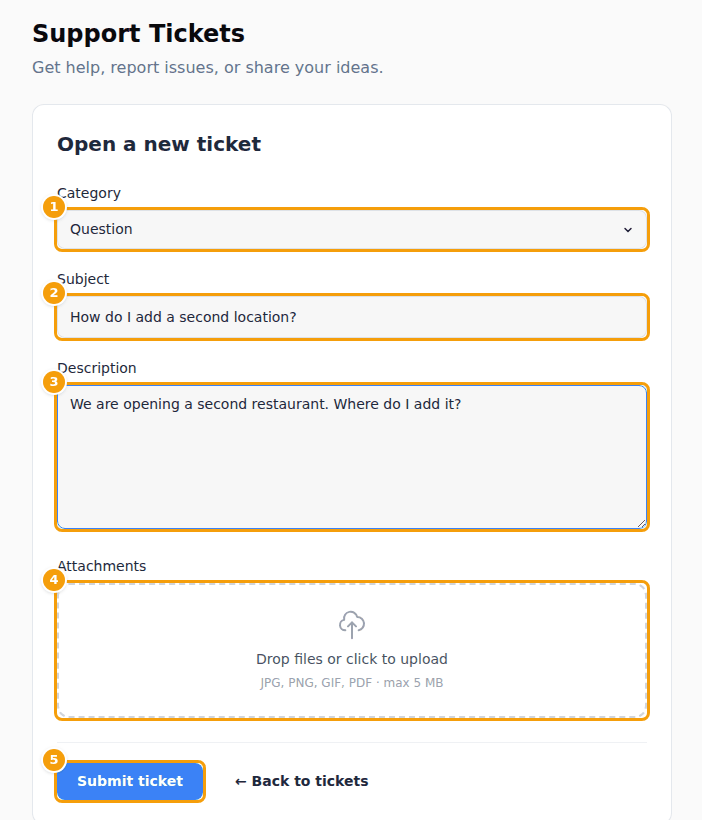
The form Open a new ticket: category (1), subject (2), description (3), attachments (4) and Submit ticket (5)
Your tickets
The list shows each ticket with its reference (Ref), Category, Subject, Status and the date of the last activity. All statuses (2) filters the list, and a click on a ticket opens it.
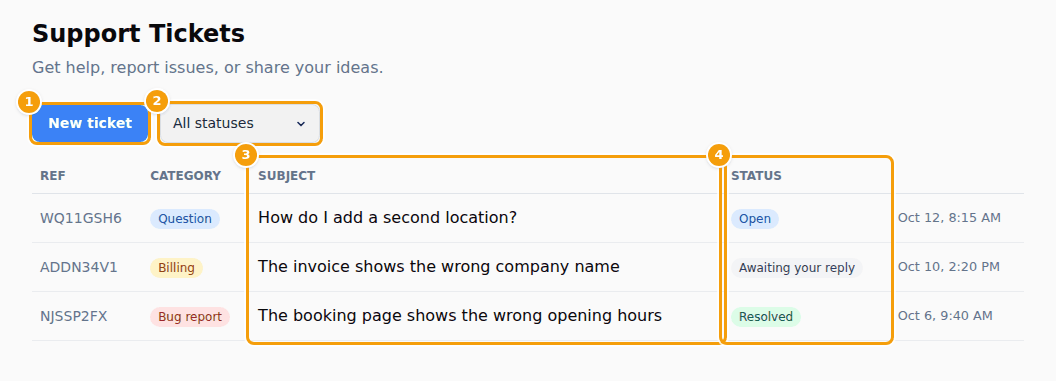
| Status | What it means |
|---|---|
| Open | Your ticket has arrived and waits for the team. |
| In progress | The team is working on it. |
| Awaiting your reply | The team asked you something or answered. It is your turn. |
| Resolved | The team considers it solved. |
| Closed | The ticket is finished. |
Reply and close
Open the ticket to read the conversation: your messages are marked You, the team's Support. Under it:
- type your answer in Your reply and click Send reply — you can attach files here too. The ticket goes back to Open if it was waiting for you;
- click Close ticket when you don't need anything else.
A Resolved or Closed ticket shows "This ticket has been closed." and takes no more replies. If the problem comes back, open a new ticket and mention the old one.
The emails you get
Clava writes to the email address of the person who opened the ticket when:
- the team replies — "Update on your ticket" — with a button that opens your ticket,
- the team marks the ticket Resolved or Closed — "Ticket status updated".
You don't get an email when you open a ticket or send a reply yourself: the ticket appears in your list at once, and on the dashboard the card Support Tickets counts what is Open and what is Awaiting your reply (see The dashboard).
Where else to ask
- The "?" at the top of every page opens the help for exactly that page, and its search finds articles on everything else (see Your profile).
- For a question about an invoice, choose the category Billing (see Plans and billing).